Send approved WhatsApp template messages from your own backend with a single POST request. This is the same pipeline Baat uses internally, so messages you send via the API appear in the shared inbox and count toward your usage just like any other message.
The fastest way: “Send via API” #
You don’t have to assemble the request by hand. Open any template’s Preview and switch to the Send via API tab — Baat generates a ready-to-run snippet for that exact template, with the channel ID, template ID, language and the parameters it expects already filled in. Copy it as cURL, Node.js or Python, drop in your API key, and send.
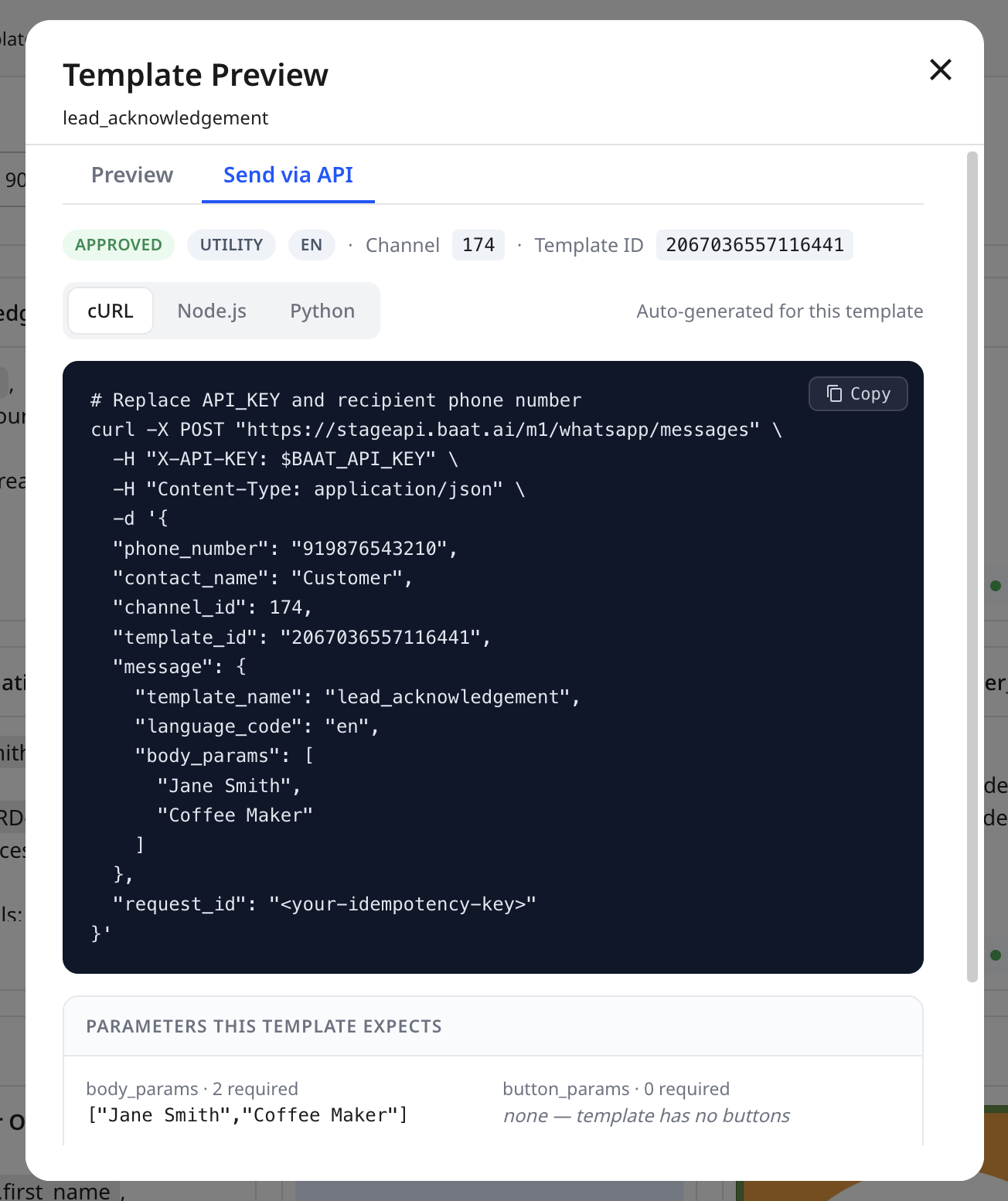
The panel also lists Parameters this template expects — how many body_params and button_params are required — so you know exactly what to supply. The rest of this article documents the endpoint in full for when you’re building the call yourself.
Endpoint #
POST https://api.baat.ai/m1/whatsapp/messages| Header | Value |
|---|---|
X-API-KEY |
Your API key (required). Must have the messages:send scope. |
Content-Type |
application/json |
Request body #
Fields use snake_case.
| Field | Type | Required | Description |
|---|---|---|---|
phone_number |
string | Yes | Recipient in international format, e.g. +919876543210. |
contact_name |
string | Yes | Display name for the contact. Used if the contact is created on first send. |
channel_id |
number | Yes | The WhatsApp channel to send from (see Contacts, channels & templates API). |
template_id |
string | Yes | The Baat template ID to send. |
message |
object | Yes | The message body — holds the template variable values (see below). |
source |
string | No | Free-text label for where the send originated (shows in analytics). |
campaign_id |
string | No | Associate the send with one of your campaigns. |
context |
object | No | Arbitrary metadata you want stored with the message. |
request_id |
string | No | Client-supplied idempotency key (see Idempotency). |
The message object #
The message object identifies the template and supplies the values that fill its placeholders. The Send via API tab pre-fills template_name, language_code and the expected parameter slots for you.
| Field | Type | Description |
|---|---|---|
template_name |
string | The template’s name, e.g. lead_acknowledgement. |
language_code |
string | The template language, e.g. en. |
body_params |
string[] | Ordered values for the body placeholders ({{1}}, {{2}}…). |
header_params |
string[] | Values for header placeholders, if the template has them. |
button_params |
string[] | Values for dynamic URL / quick-reply button parameters. |
body_params_by_name |
object | Alternative to body_params for named-variable templates: {"name":"Jane Smith"}. |
Example #
This is the shape the Send via API generator produces — replace the API key and recipient number:
curl -X POST "https://api.baat.ai/m1/whatsapp/messages"
  -H "X-API-KEY: $BAAT_API_KEY"
  -H "Content-Type: application/json"
  -d '{
    "phone_number": "919876543210",
    "contact_name": "Customer",
    "channel_id": 174,
    "template_id": "2067036557116441",
    "message": {
      "template_name": "lead_acknowledgement",
      "language_code": "en",
      "body_params": ["Jane Smith", "Coffee Maker"]
    },
    "request_id": ""
  }'
phone_number is the recipient in international format with country code (the leading + is optional, e.g. 919876543210). Store your key in an environment variable like $BAAT_API_KEY rather than hard-coding it.
Response #
A successful send returns 202 Accepted — the message is accepted and queued for delivery:
{
  "success": true,
  "message_id": "a1b2c3d4e5",
  "status": "queued"
}
Use the returned message_id to correlate the message with delivery-status updates and inbox records.
Idempotency #
Set request_id to a unique value per logical message (for example your order ID plus the event). If a retry sends the same (organization, request_id) pair again, Baat returns the previously-created message instead of sending a duplicate — so a network timeout-and-retry won’t double-message your customer.
Errors #
| HTTP | status |
Cause |
|---|---|---|
401 |
unauthorized |
Missing, unknown, inactive or expired API key. |
403 |
insufficient_scope |
Key lacks the messages:send scope. |
400 |
(message) | Invalid request — e.g. missing required field or unknown template/channel. |
500 |
internal_server_error |
Unexpected error on Baat’s side; safe to retry with the same request_id. |


